In the era of digital exploration, building a beautiful standalone website with Elementor is just the first step. The first major challenge many companies expanding overseas face is often: “Why can’t I find my website on Google?”
No matter how beautifully designed a website is, without a solid underlying SEO architecture to support it, it’s like opening a lavishly decorated flagship store deep in the mountains—there simply won’t be any foot traffic. Throughout our work at ZLink Jidian Studio managing campaigns for hundreds of B2B manufacturing companies and B2C brands, we have long since completely abandoned the bloated and outdated Yoast SEO, adopting Rank Math as the standard underlying configuration for all our standalone websites.
There are many tutorials on Rank Math available online, but most are based on outdated interfaces from several years ago and are full of theories that don’t apply to real-world scenarios. Today, this in-depth, step-by-step guide will reveal exactly how we configure Rank Math here at ZLink. We’ll skip the useless fluff and cut straight to the core settings that will actually bring you real international sales leads.
If you haven't installed this amazing plugin yet, please click here to download it first:Rank Math SEO PRO。
Step 1: Plugin Installation and Initial Configuration (Setup Wizard)
1. Install Rank Math
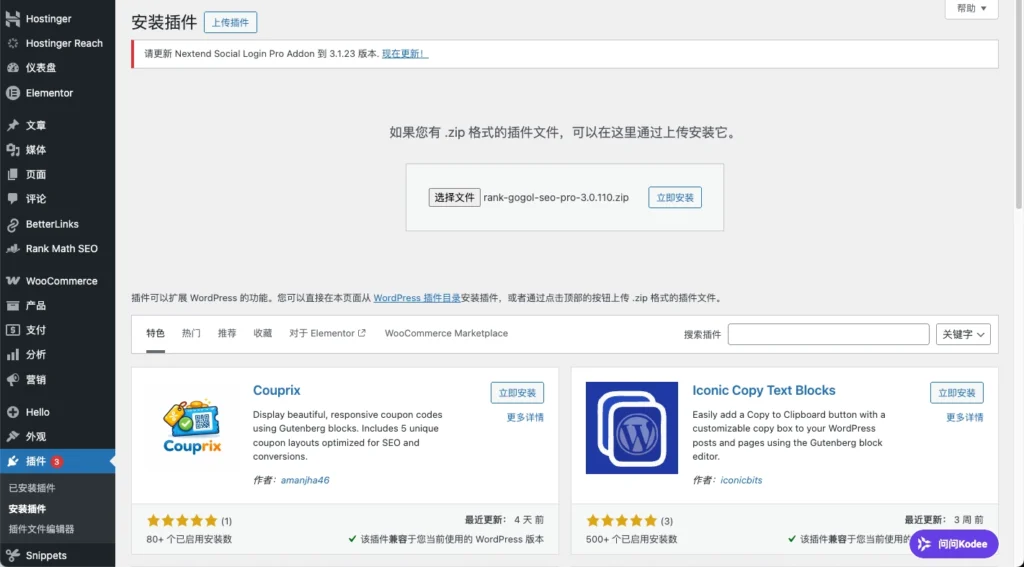
Log in to the WordPress dashboard and click Plugins -> Install a Plugin (Add New) -> Upload the Rank Math Pro version of the plugin -> Click to install and enable。
2. Launch the Setup Wizard
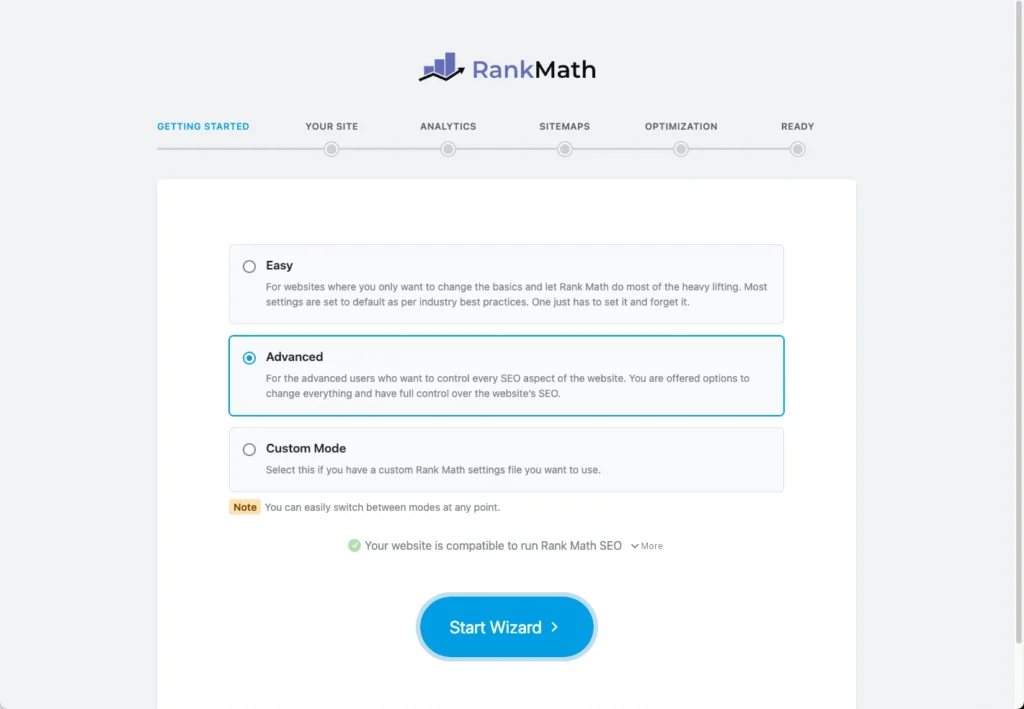
When you use the system for the first time, you'll be prompted to link an account, but you can skip this step for now. You'll then be taken to Setup Wizard Interface.
- Mode Selection: We strongly recommend that you do not select "Easy"; instead, select Advanced (Advanced Mode)...that way, we can have complete control over the website's SEO details.
- Data Migration: If you were previously using another plugin, such as Yoast SEO, Rank Math will prompt you to import your settings with a single click. This one-click, seamless migration ensures you won’t lose your search rankings—it’s incredibly hassle-free.
3. Basic Website Settings (Your Site)
This step is about telling Google’s crawlers exactly “who” your website is and “what” it does. Setting this up correctly can help your brand appear more professionally in Google search results—especially in the Knowledge Panel on the right—and it’s also an excellent place to incorporate your core brand keywords.
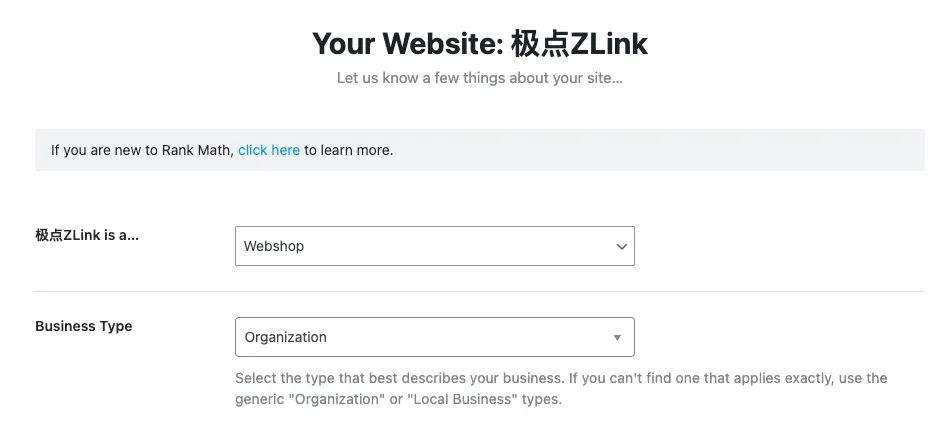
● Your website is… (Your Website is a…) For example, since our Jidian ZLink offers professional enterprise services for global expansion, we recommend scrolling down and selecting “Small Business Site.” If you operate an independent B2C retail website, please select “Webshop.”
● Business Type For the vast majority of companies expanding overseas, simply selecting “Organization” here is sufficient.
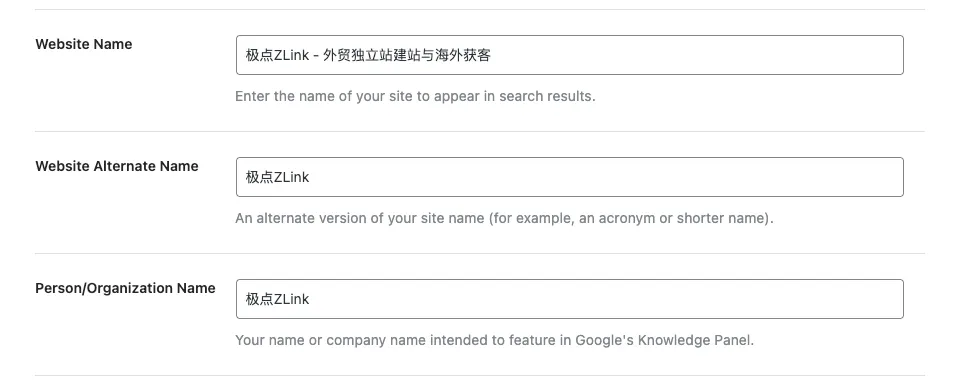
● Website Name —— 💡 Key SEO keyword placement We strongly recommend using the “brand name + core business positioning” formula. Google now prominently displays the website name at the top of search results; this is not only Schema structured data intended for search engines but also a sign that encourages users to click.
- Jidian ZLink Hands-On Demo: Do not just enter “Jidian ZLink”; we recommend entering Jidian ZLink – Building Independent E-commerce Sites for International Trade and Acquiring Overseas Customers (Or include key terms such as social media management and advertising.)
- The Value of SEO: This helps Google quickly associate your brand with high-conversion industry terms such as “independent website” and “customer acquisition,” thereby boosting your search ranking in your vertical. Note that it’s best to keep the character count within 30 characters.
● Website Alternate Name Enter your brand name or abbreviation here.
- Jidian ZLink Hands-On Demo: Fill in Pole ZLink 或 ZLink。
- SEO Logic: This is to let Google know that when users search only for the abbreviation, they are looking for the same company, thereby fully accommodating users' search habits.
● Name of Individual/Organization (Person/Organization Name) Enter the official brand name (e.g.,Pole ZLink). Google uses this information to build a Knowledge Graph entity for your company.
● Google Special Logo (Logo for Google)
Required field! Upload your brand logo. When users search for your brand, this logo may appear directly in the search results.
- Dimension Requirements: We strongly recommend using square images with a 1:1 aspect ratio and a minimum size of 112 x 112 pixels to ensure clarity on all devices.
● Default Social Share Image
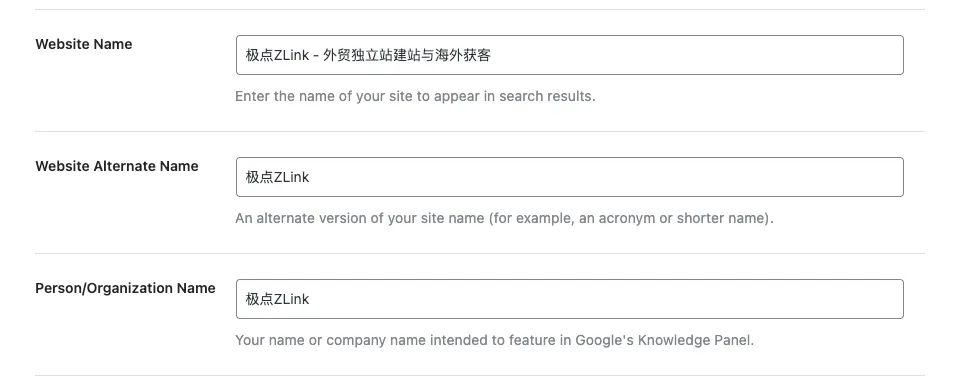
A detail that’s extremely important but often overlooked! In international trade, we often send website URLs to clients via WhatsApp or Facebook. If the shared page doesn’t have a header image, major social media platforms will display an extremely unattractive default image—or may not display it at all.
- Operational Recommendations: Please upload a high-resolution, generic poster featuring the “Jidian ZLink” logo and the tagline “Website Development, Social Media, and Advertising for Customer Acquisition.”The optimal dimensions are 1200 x 630 pixels. This way, no matter which page of your website others share in the future, it will project a top-notch, professional image.
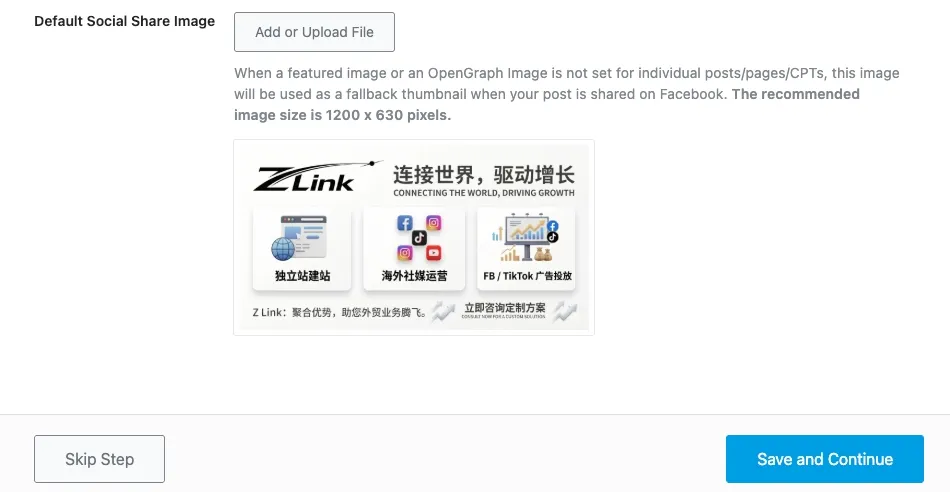
Once you have confirmed that all the information is correct, click the blue button in the lower-right corner. Save and Continue, proceed to the next step.
4. Connect to Google Services (Analytics) — Say Goodbye to Data Gaps
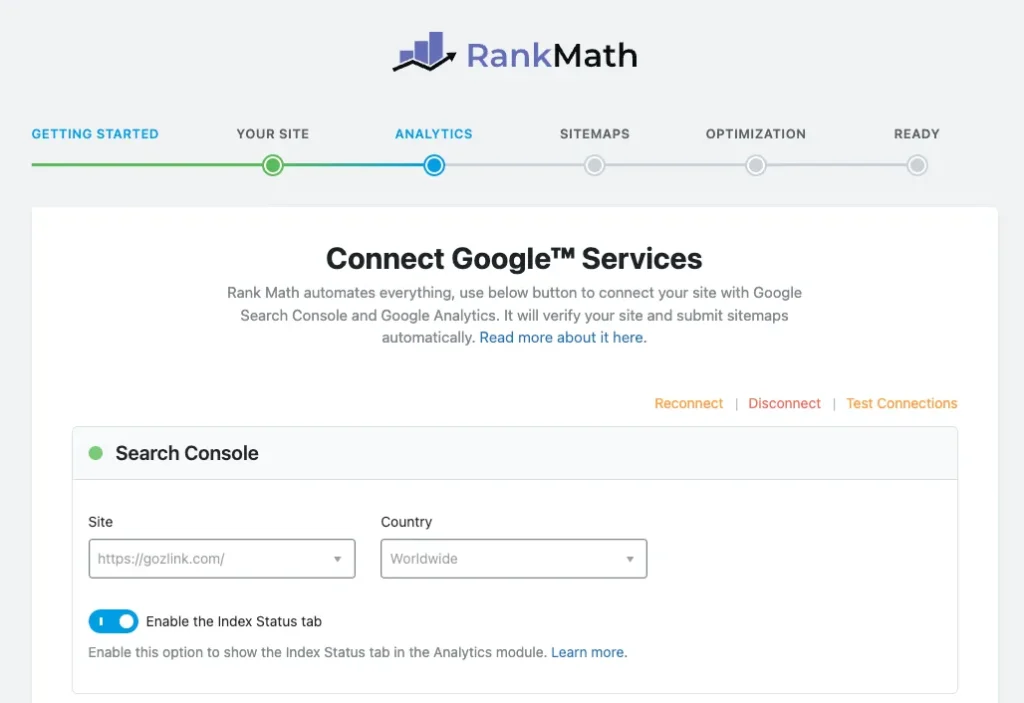
Running an independent e-commerce site without analyzing data is like driving with your eyes closed. In this step, we’ll connect the website’s SEO control center directly to Google’s official database. Here, you’ll need toGoogle Search Console(GSC)和Google Analytics(GA4)Register your account in advance and link your website domain; there’s no need to install tracking code—RankMath will handle that for you automatically.
● Search Console (GSC – Google Search Console)
- Site (Website): Select your current website’s domain from the drop-down menu. (This assumes you’ve already verified the domain in Google Search Console. If not, Rank Math will automatically verify it for you during the authorization process, which is very convenient.)
- Country (Country/Region): If you're targeting the global market, keep the default setting as "Worldwide"; if you're targeting only specific countries (for example, B2B in the U.S. only), you can select a specific country from the drop-down menu here.
- Enable the Index Status tab:Be sure to turn it on. This lets you see right in the WordPress dashboard whether a specific post or product “has been indexed by Google”—it’s incredibly useful!
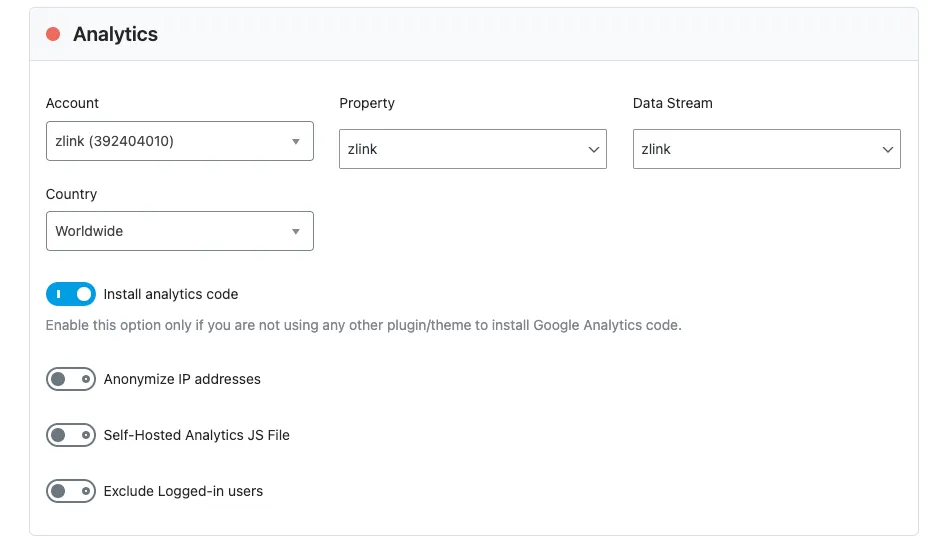
● Analytics (GA4 – Google Analytics) Select your Account, Property, and Data Stream from the drop-down menus in that order.
⚠️ Jidian ZLink: Ultimate Warning to Avoid Pitfalls: Install analytics code
- Under what circumstances must it be turned off? If you have already installed the GA4 tracking code on your website using Elementor code snippets, Google Tag Manager (GTM), or other methods such as WPCode, be sure to turn it off here! Otherwise, it will cause the code to load twice, resulting in duplicate data and errors.
- Under what circumstances can it be turned on? If you have a brand-new website that doesn't currently have any Google Analytics code installed, you can enable it and let Rank Math handle installing the tracking code for you.
● AdSense (Google Ads) For the vast majority of Jiedian ZLink’s international clients (B2B manufacturers and B2C brand-owned websites), we generate revenue by selling products and machinery, not by displaying ads on their websites. Therefore,Just ignore this option and leave it blank.。
● Email Reports
- Email Reports: Keep it turned on.
- Report Email Address: Enter your work email address. Rank Math will send you a concise weekly or monthly SEO report, allowing you to stay on top of traffic trends at any time without having to log in to your website’s admin panel (a feature that bosses and operations managers love).
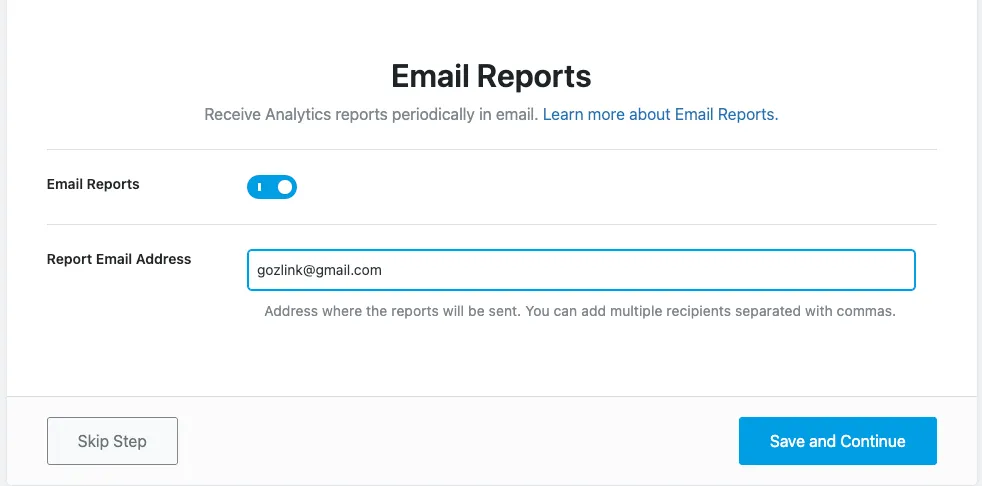
Once everything is set up, click the button in the lower-right corner Save and Continue。
5. Sitemap Settings — A Highway for Google's Crawlers
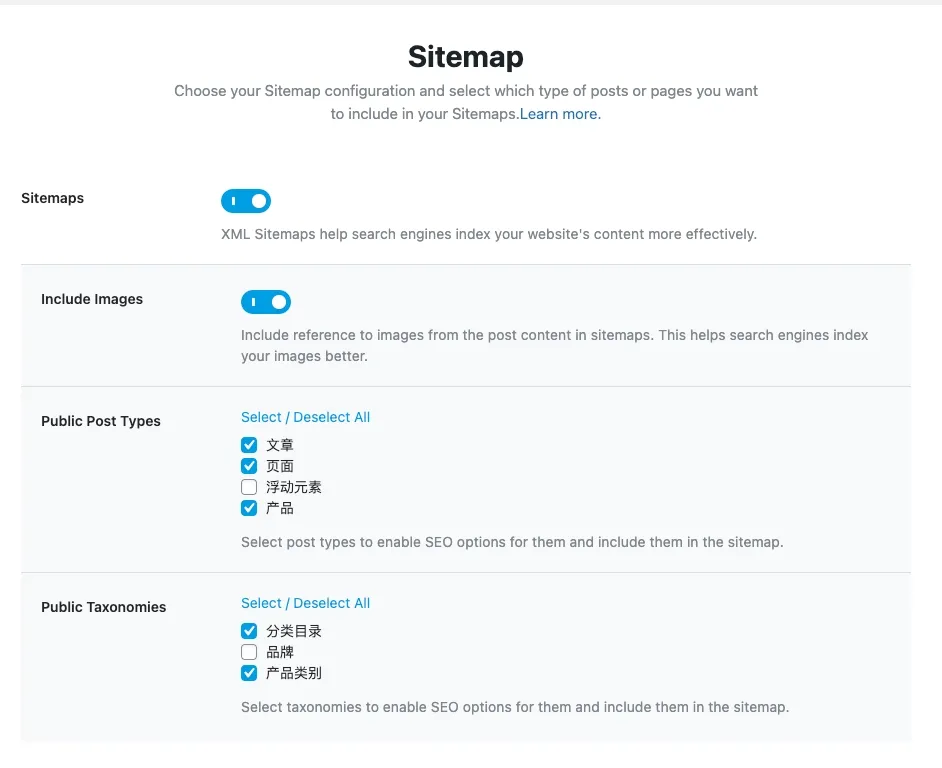
A sitemap (XML sitemap) is like a map of your website; it tells search engines which pages are most important and which ones should be crawled first.
● Sitemaps (Enable Sitemaps):Be sure to turn it on. This is the foundation of SEO.
● Include Images:Open. For independent e-commerce sites, traffic from Google Images can be substantial. Enabling this feature makes your product images easier to find.
● Public Post Types (Public Post Types)
- Required: Check the boxes next to “Posts” and “Pages.”
- Business-related: If you have Elementor or WooCommerce installed, be sure to check the “Products” box. As for “Floating Elements (Templates/Popups),” these typically do not need to be indexed by search engines, so we recommend unchecking this box to avoid wasting your crawl budget.
● Public Taxonomies — 🚨 Key Pitfalls to Avoid!
- Recommended: Check this box: “Categories” and “Product Categories.”
- We strongly recommend unchecking this box.: “Tags” and “Brands.”
- 💡 ZLink's Exclusive Analysis: Many beginners check all the options, which can lead to serious “duplicate content” issues. This is because the content on tag pages often overlaps significantly with that on category and post pages. Unchecking the tag option allows Google to focus its valuable ranking power on your core articles and product pages.
● News Sitemap & Video Sitemap Unless your website has already been successfully added to Google News, or your website primarily features a large number of self-hosted videos (not YouTube embeds), you can leave these two options turned off by default.
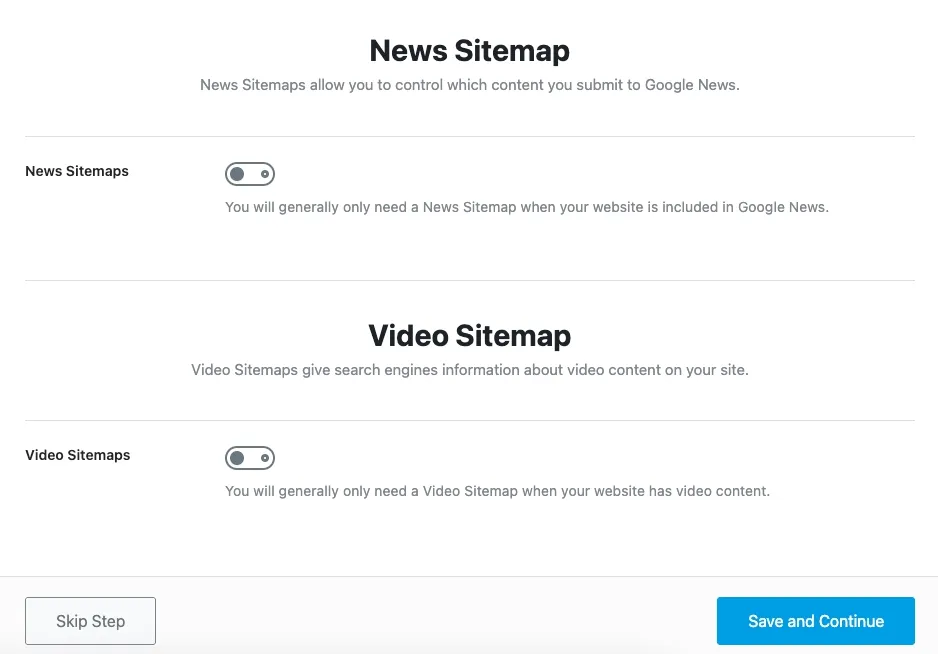
Once you've confirmed everything, click Save and Continue。
6. SEO Fine-Tuning (Optimization) — Correcting Outdated SEO Concepts
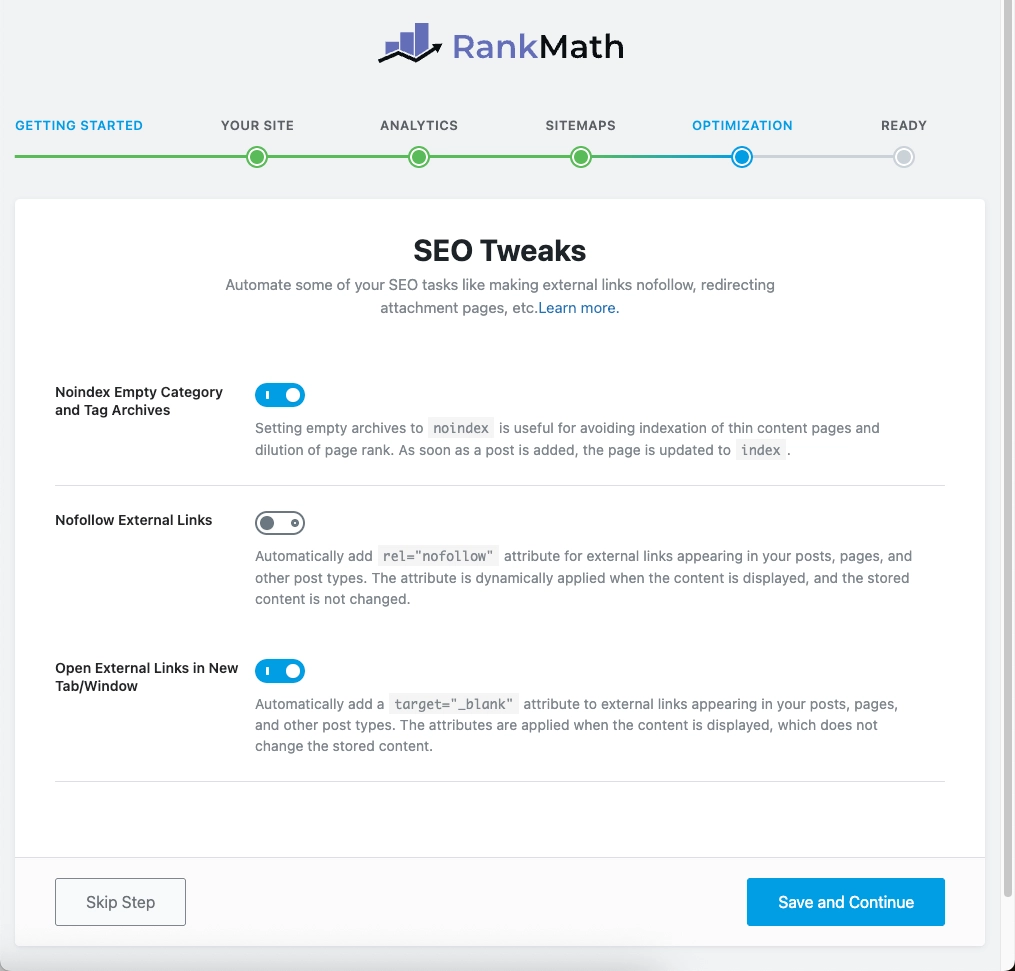
● Noindex Empty Category and Tag Archives (Do not index empty category and tag archives)
Be sure to turn it on. Enabling this option prevents Google from crawling “empty pages” that do not contain any products, thereby avoiding the creation of “low-quality pages (thin content)” and protecting the overall authority of your website.
● Nofollow External Links (Automatically Set External Links to "Nofollow") —— 🚨 Strongly recommended to turn this off!
💡 ZLink’s Exclusive Guide to Avoiding Pitfalls: This is an extremely outdated and harmful concept under today’s Google algorithms! Modern SEO (especially the E-E-A-T principles) holds that naturally linking to high-authority websites within an article helps demonstrate the content’s expertise. Keep this option turned off and only manually check it when adding ads or sponsored links.
● Open External Links in a New Tab/Window (Open external links in a new tab)
Be sure to turn it on. When visitors click on an external link, the system automatically opens it in a new tab. This way, your website remains open in the background of the visitor’s browser, which significantly reduces the “bounce rate.”
Once everything is set up, click the button in the lower-right corner Save and Continue。
Step 2: Configure Advanced Options (Setup Advanced Options)
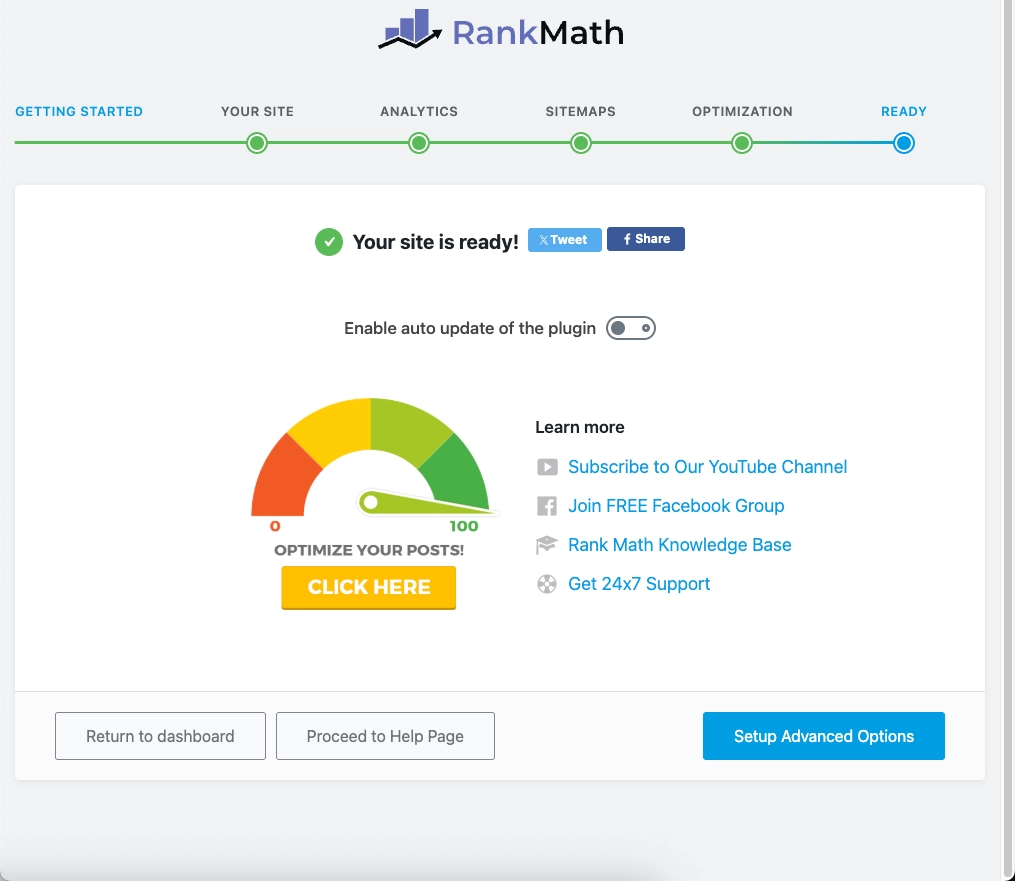
1. Completion of the Basic Wizard and Advanced Choices (Ready)
● About Automatic Updates (Enable auto update of the plugin)
💡 Jidian ZLink Operations and Maintenance Recommendations: Keep it turned off (Off). Automatic plugin updates can occasionally cause conflicts with existing themes or the editor. The best practice is to manually click "Update" periodically and keep a full site backup.
● Key Steps Moving Forward Do not click “Return to dashboard” on the left. Please click the blue button in the lower-right corner Setup Advanced Options Button. The real SEO secrets are hidden in the next steps.
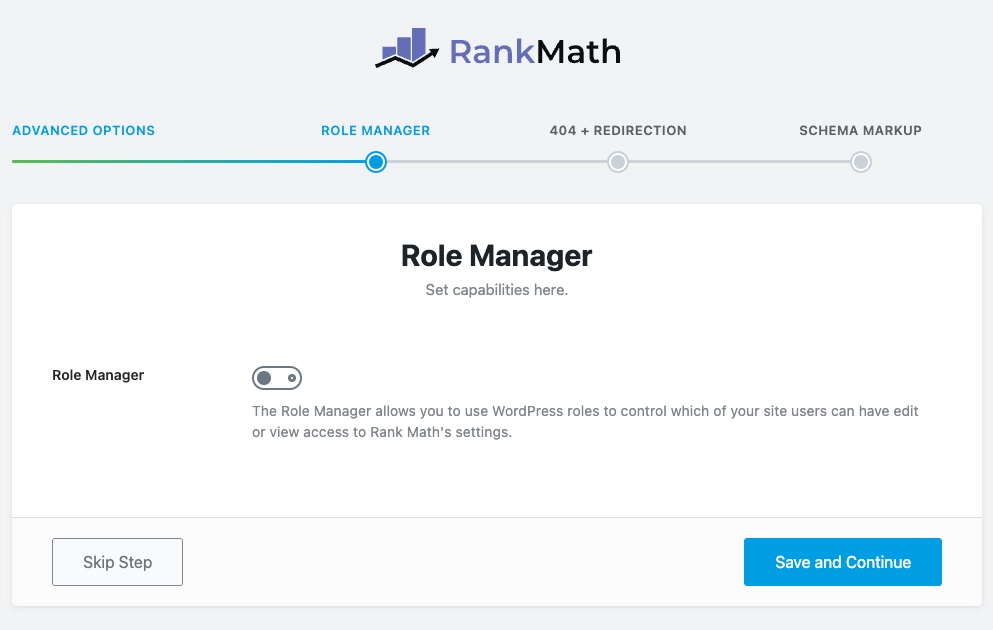
2. Role Manager — The Safety Net for Team Collaboration
The main purpose of this interface is to assign SEO permissions.
● Solo Webmaster (One person handles the entire site) If you are the only person managing this website, or if you personally format and publish all the content written by others, simply set this option to "Off."
● Team Collaboration (Jidian ZLink Recommended Configuration for Real-World Use) If your team has a dedicated “content editor” or a foreign writer, we strongly recommend enabling this feature and ensuring proper permission segregation:
- Administrator: Keep "Select All" selected to retain the highest level of control over the entire system.
- Editor / Author: Grant them only the permissions related to publishing individual articles, such as On-Page Analysis.
- 🚨 The Ultimate Warning to Avoid Pitfalls: Never grant regular editors access to General Settings or Title & Meta Settings. Professional matters must be strictly restricted by permissions!
Once you've finished setting it up, click the button in the lower-right corner Save and Continue。
3. 404 Monitoring and Redirection (404 + Redirection) — Recovering Lost Traffic and Page Rank
Please set both switches on the screen to the blue "On" position:
● 404 Monitor (404 Monitoring)
Be sure to set it to "On". When you remove a product from your store and delete its page, enabling monitoring allows Rank Math to log every “broken link” that visitors encounter in the background, thereby preventing a poor user experience.
● Redirects
Be sure to set it to "On". This is the ultimate tool for fixing broken links. Combined with 404 monitoring, you can set up a permanent 301 redirect from old links to the pages of new products, which not only recovers leads but also passes on SEO authority.
💡 Jidian ZLink Operations and Maintenance Insights: These two features work together as a comprehensive solution. Without monitoring 404 errors, you won’t know where traffic is “leaking”; without redirects, you won’t be able to plug those leaks.
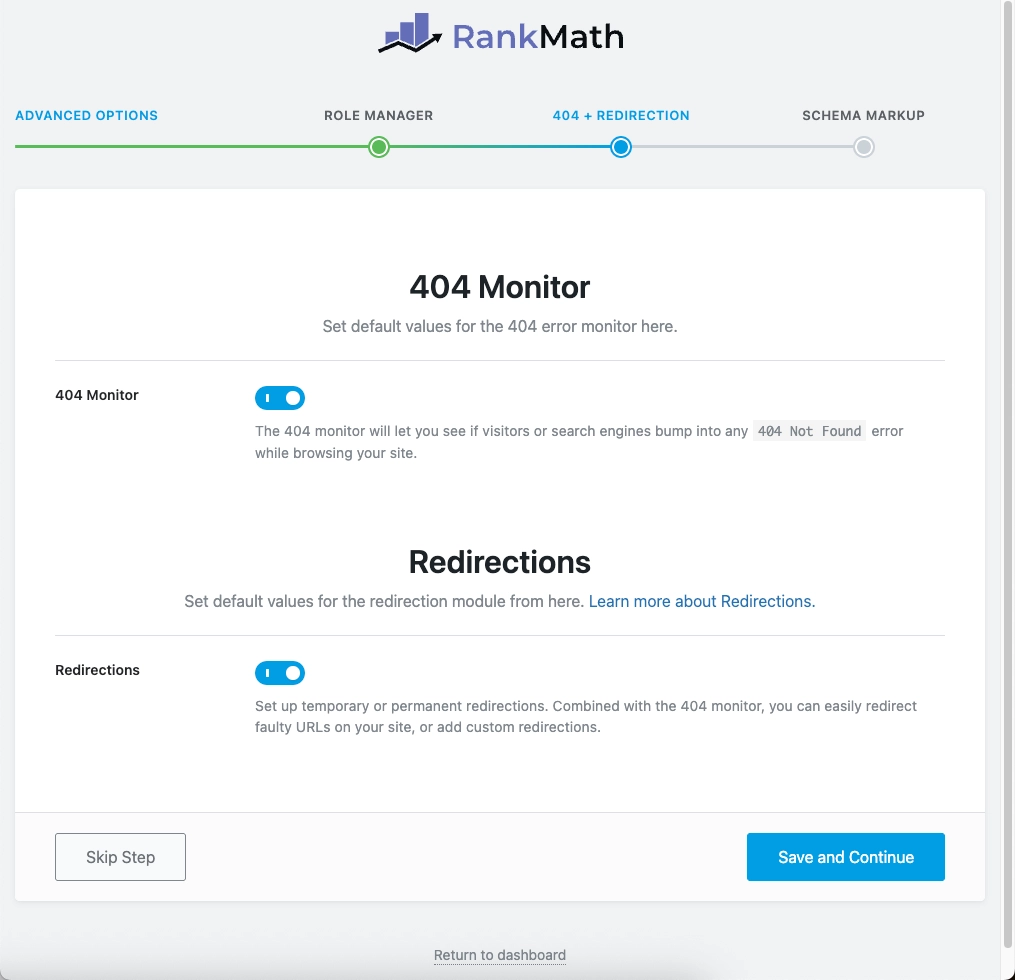
Once you've confirmed that it's turned on, click the button in the lower-right corner Save and Continue。
4. Schema Markup — Make Your Search Results “Richer”
● Schema Type (Enable Structured Data):Be sure to set it to "On". This is the prerequisite for all rich media search results.
● Schema Type for Posts Select "Article" from the drop-down menu, and under "Article Type," select "Blog Post."
● Schema Type for Pages
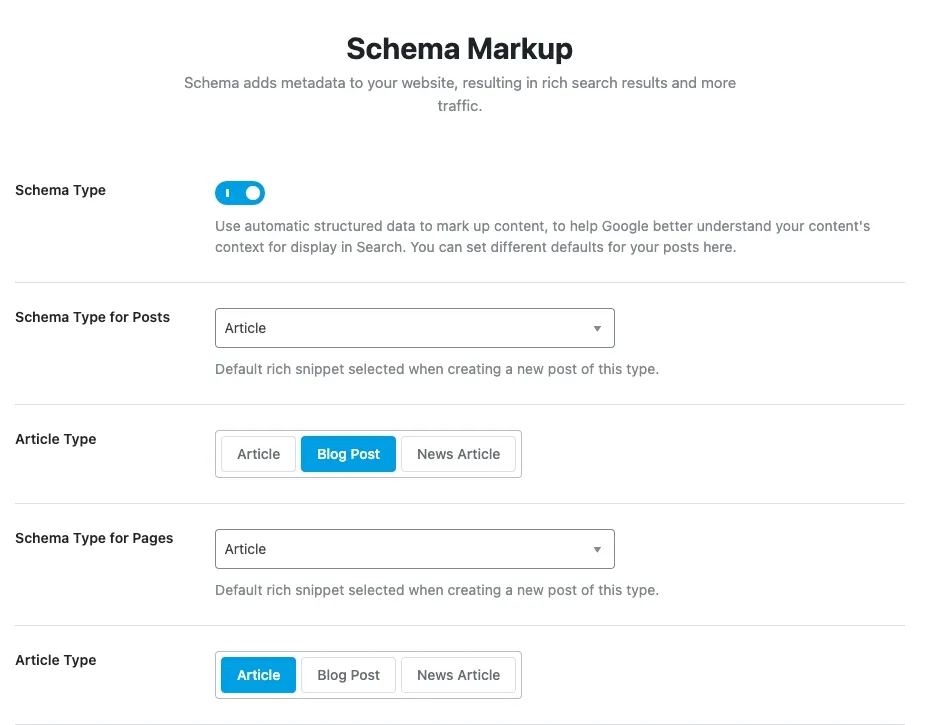
💡 Practical Tips for ZLink: Since Pages are typically used to build static web pages, we recommend that when you publish specific single-page services in the future, you manually change the type to "Service" or "AboutPage" in the settings for each individual page.
● Floating elements/other custom layout types (such as E-floating-buttons) Select "None." Do not add Schema to non-core content (such as pop-ups) to avoid interfering with search engines.
● Schema Type for Products
The Absolute Core! Please be sure to highlight the blue text. Product. This is crucial for foreign trade companies, as it allows them to display relevant product specifications directly in search results.
💡 Jidian ZLink Advanced Tips: When editing a major industry white paper, you can also add separate FAQ or Video Schema markup in the editor’s sidebar.
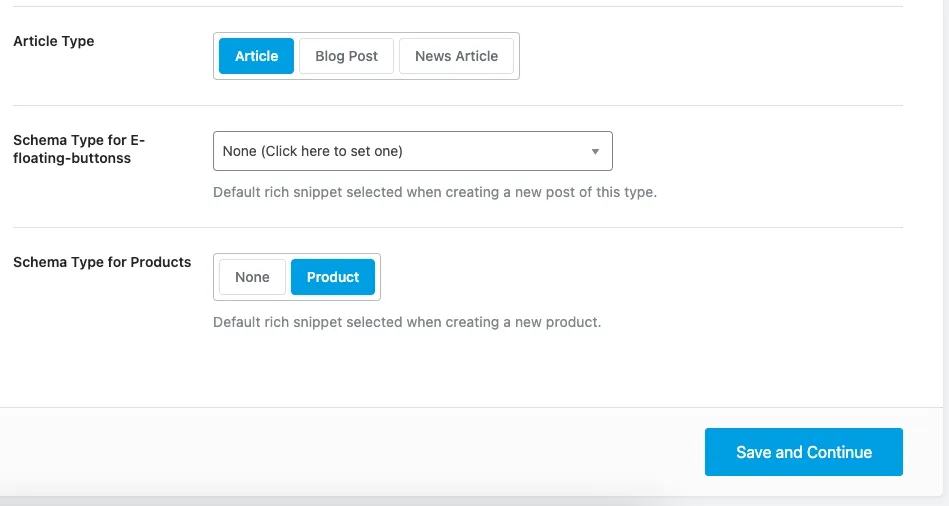
After confirming that everything is correct, click the button in the lower-right corner Save and Continue。
🎉 With that, you’ve now completed the most essential—and most tedious—part of the Rank Math setup wizard!
Step 3: Enable Core Control Panel Modules (Dashboard Modules)
After completing the setup wizard, go to the Rank Math dashboard. Simply enable the following core modules:
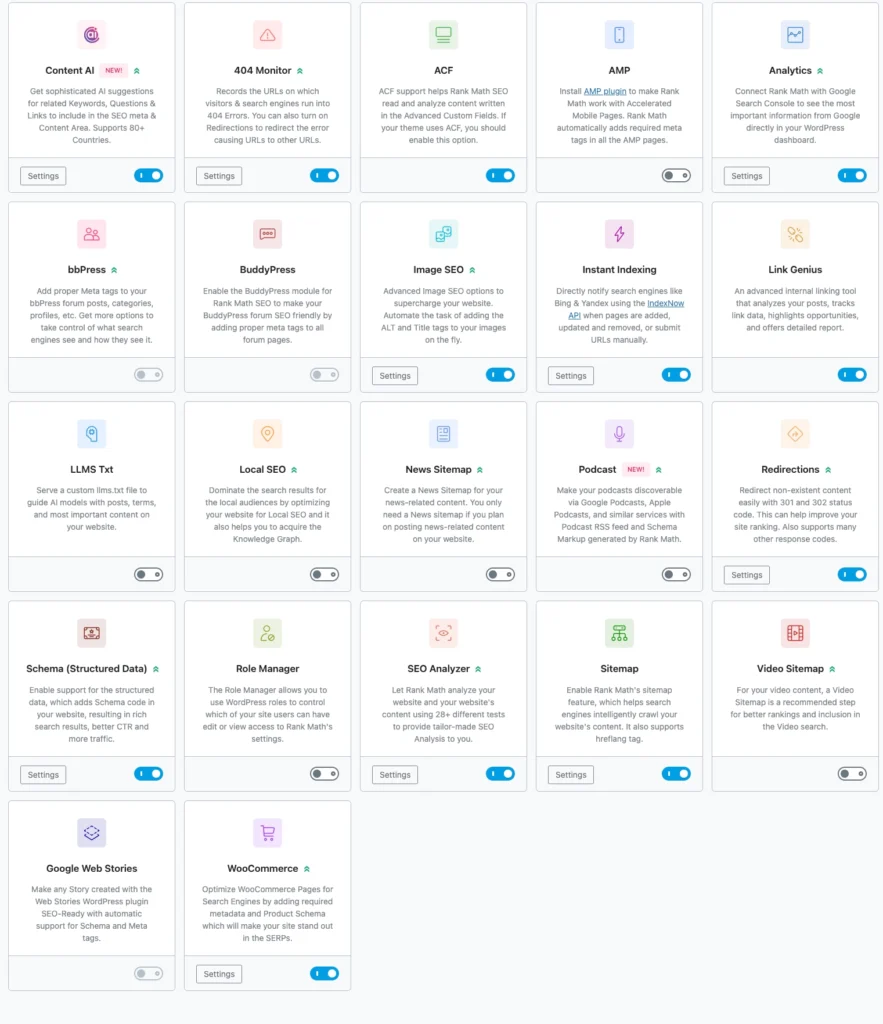
| Module Name | Recommended Settings | Note |
| Content AI | 🟢 Turn on | 2026: Latest Core Features—Intelligently analyzes keywords and provides SEO writing suggestions. |
| 404 Monitor (404 Monitoring) | 🟢 Turn on | Track the error pages visitors access to prevent traffic loss. |
| ACF (Advanced Custom Fields) | 🔵 Turn on as needed | If you used the ACF plugin when building your site, you must enable it; otherwise, disable it. |
| AMP (Accelerated Mobile Pages) | ⚪ Close | It can easily cause serious code conflicts with modern page builders such as Elementor. |
| Analytics (Data Analysis) | 🟢 Turn on | View Google rankings and traffic data directly in the WordPress dashboard. |
| bbPress / BuddyPress | ⚪ Close | Unless your independent website includes a forum or social community feature. |
| Image SEO (Image Optimization) | 🟢 Must be enabled | 🚨 Note: The screenshot shows the feature turned off—be sure to turn it on! Automatically fill in ALT tags. |
| Instant Indexing (Quick Indexing) | 🟢 Turn on | After a new product is released, it is automatically submitted to search engines within seconds. |
| Link Genius | 🟢 Turn on | Smart internal link analysis tool to improve the distribution of internal link equity on your website. |
| LLMS Text / Podcast | ⚪ Close | This is not currently necessary for standard corporate websites targeting overseas markets. |
| Local SEO | 🔵 Turn on as needed | If your company has overseas showrooms or branch offices, please enable this option. |
| News / Video Sitemap | ⚪ Close | Unless it's a news portal or a site that primarily features a large number of its own videos. |
| Redirects | 🟢 Turn on | Use in conjunction with 404 monitoring to restore search engine rankings. |
| Schema (Structured Data) | 🟢 Turn on | Display rich text such as star ratings, prices, FAQs, and more in search results. |
| Role Manager | 🔵 Turn on as needed | Keep "Single-User Management" turned off; if you have team editing, turn it on and restrict permissions. |
| SEO Analyzer | 🟢 Turn on | Perform a comprehensive SEO audit and performance assessment for your entire website with a single click. |
| Sitemap | 🟢 Turn on | The absolute cornerstone of SEO, guiding Google’s crawlers to crawl the entire site. |
| Google Web Stories | ⚪ Close | It is rarely used on standard B2B/B2C e-commerce sites. |
| WooCommerce | 🔵 Turn on as needed | If you have WooCommerce installed, be sure to enable it! |
Step 4: General Settings and SEO “Shortcuts” (General Settings)
1. Links (Link Settings)
● Strip Category Base (Remove Category Base)
💡 ZLink Core: A Guide to Avoiding Pitfalls: If you are a A newly built website, it is strongly recommended that you On! This can shorten the URL to gozlink.com/seo/。
- 🚨 Attention: If you are An established website that already has traffic, please be sure to keep Off! To prevent all old links from becoming 404 broken links.
● Redirect Attachments: 🟢 Must be set to "On". This prevents Google from classifying image attachment pages as “low-quality, thin content” and automatically redirecting users to specific article or product pages.
● Redirect Orphan Attachments: Enter the link to your website's homepage (e.g., https://gozlink.com)。
● Nofollow External Links / Nofollow Image File Links: ⚪ Keep it turned off (Off). This complies with Google's E-E-A-T principles.
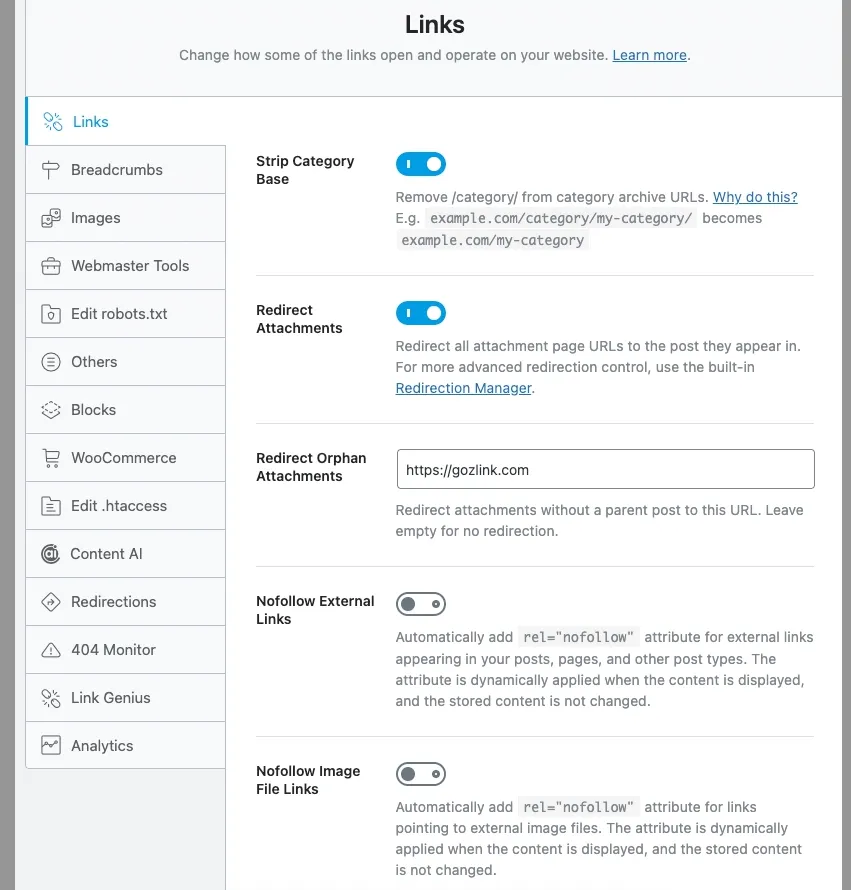
● Open External Links in a New Tab/Window (Open external links in a new tab): 🟢 Must be set to "On". Ensure that the pages of the standalone site remain in the user's browser.
● Affiliate Link Prefix: Leave blank.
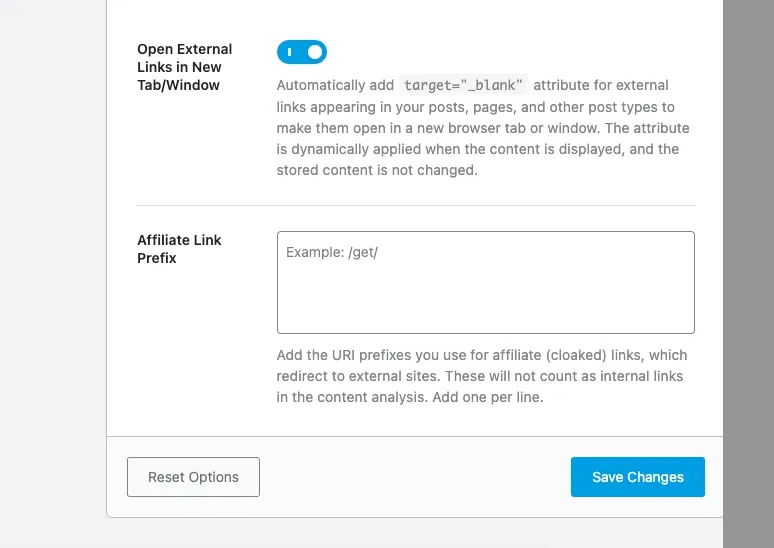
After confirming all settings, click Save Changes。
2. Breadcrumbs
Please check against the following criteria:
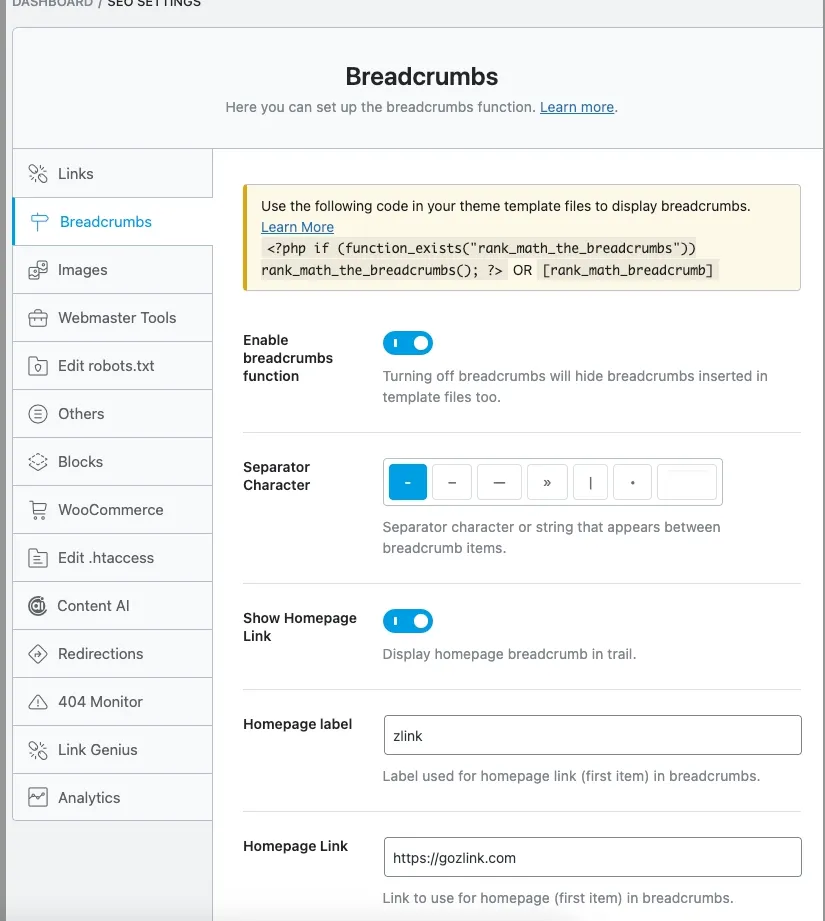
- 🚨 The yellow code hint box at the top: You need to copy the shortcode Paste this into your page builder template for the breadcrumbs to work properly.
- Enable the breadcrumbs feature: 🟢 Be sure to set it to "On"。
- Show Homepage Link: 🟢 Be sure to set it to "On"。
- Homepage label (Homepage label): The most standard way to fill this in is "Home."
- Homepage Link (Homepage Link): Enter the absolute path to the website.
- Minor Text Formatting Adjustments (Keep Defaults): Leave "Prefix Breadcrumb" (blank) and "Archive Format" set to their default values.
- Advanced-Level Control: Hide Post Title, Show Category(s), Hide Taxonomy Name (usually) Keep Closed。
3. Images (Automated Image SEO)
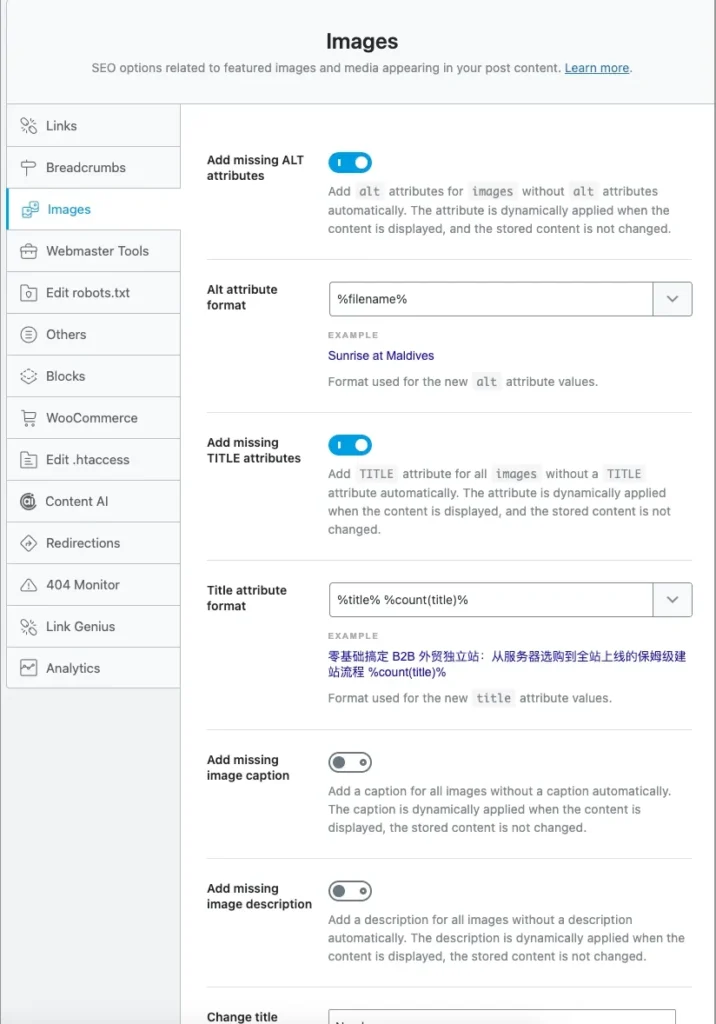
● Add missing ALT attributes: 🟢 Be sure to set it to "On". Search engines use the ALT attribute to recognize images, and Rank Math automatically fills it in using the filename.
● Add missing TITLE attributes: 🟢 Recommended: On。
● Add a missing image caption or description: ⚪ Keep Off. It can easily disrupt the layout.
● 🚀 Exclusive Advanced Features of Jidian ZLink: Replacements (Character Replacement) Type a hyphen (-) in the "Find" box, and type a space in the "Replace" box. Check the "Alt" and "Title" boxes.
- Magic Effects: When you upload cnc-machining-parts.jpg, the system-generated ALT tag will become the very natural "cnc machining parts."
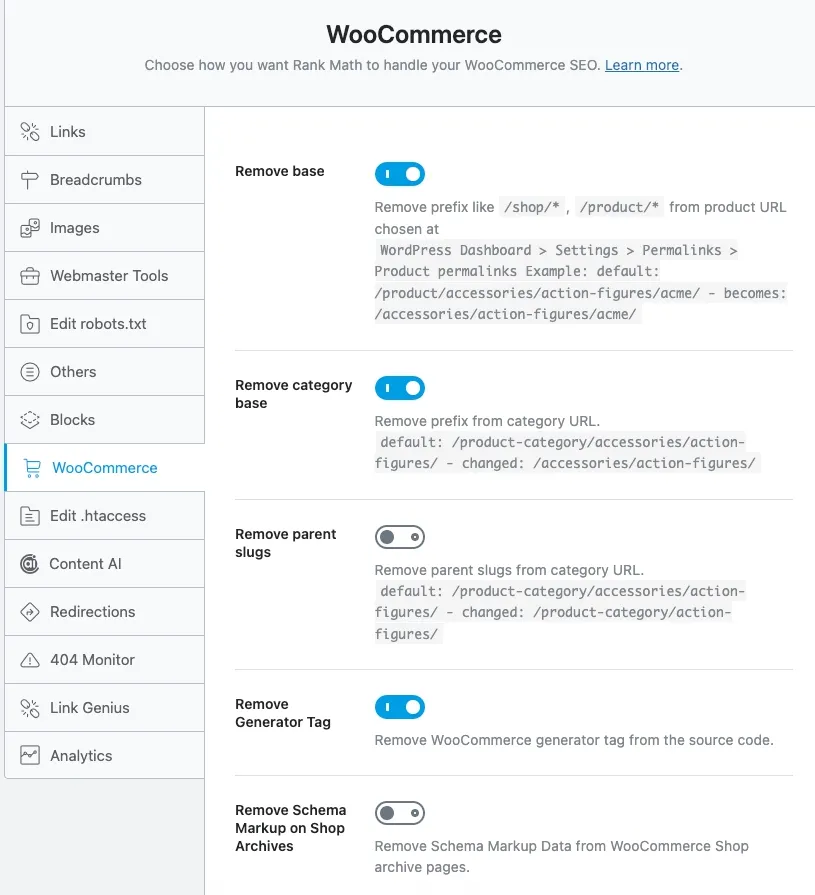
4. WooCommerce (E-commerce/Product Catalog Optimization)
● Remove base (Remove the product's base path): 🟢 On. Shorten the URL for higher ranking.
● Remove category base (Remove the product category base URL): 🟢 On. Remove the extra "product-category" from the URL.
● Remove parent slugs (Remove parent paths): ⚪ Recommended setting: Off. Keeping the parent path helps identify the product structure.
● Remove Generator Tag: 🟢 On. Improve safety.
● Remove Schema Data from Shop Archives: ⚪ Keep it turned off (Off).
Step 5: Hands-On Practice! How to Boost the SEO Score of a Single Article or Product to 100
When you publish an article or upload a product, please pay close attention to the following steps:
1. Set the Focus Keyword Enter the core keywords you want to target in the text box.
- 💡 Efficiency Tip: Not sure how to come up with ideas? Try using a premium AI service (such as ChatGPT Plus or Gemini Pro) to help with your writing. We recommend using the one that’s popular in the cross-border e-commerce community. Interstellar Screening Room - Membership Top-Up and Shared Subscription Platform。
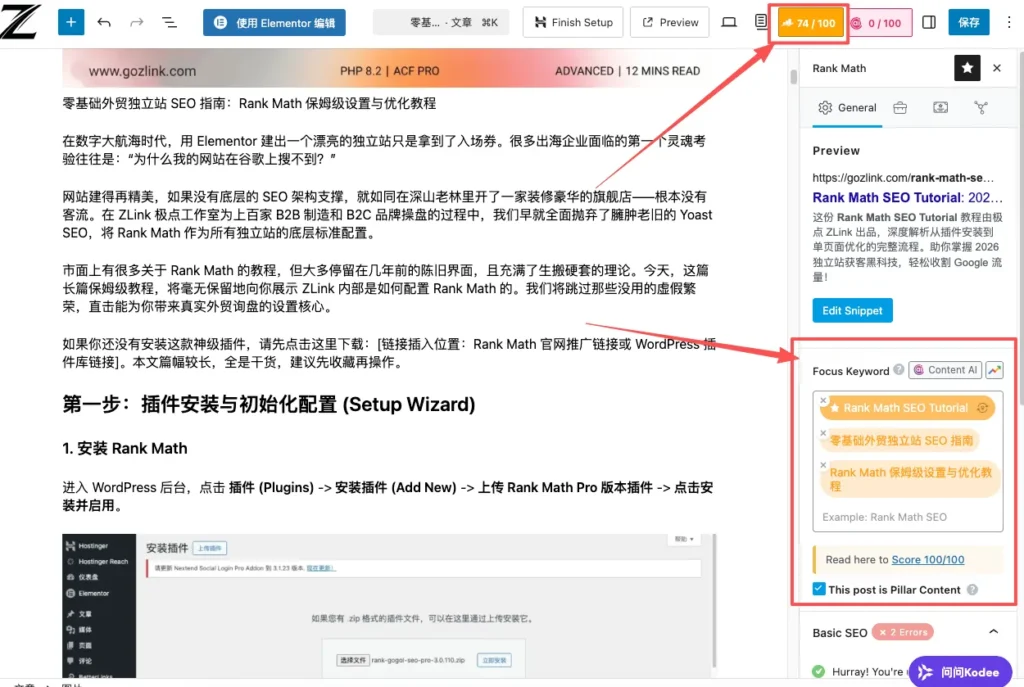
2. Basic SEO must be all green
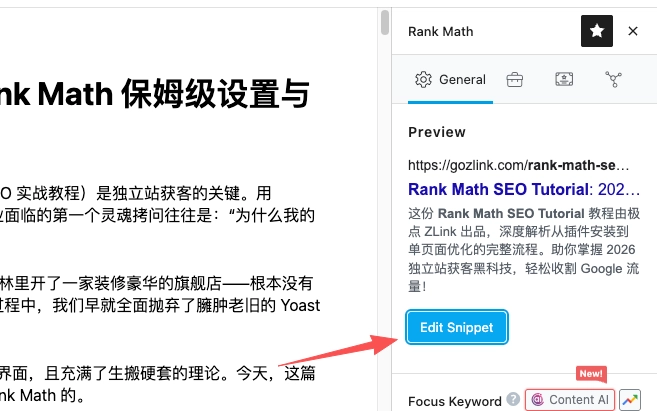
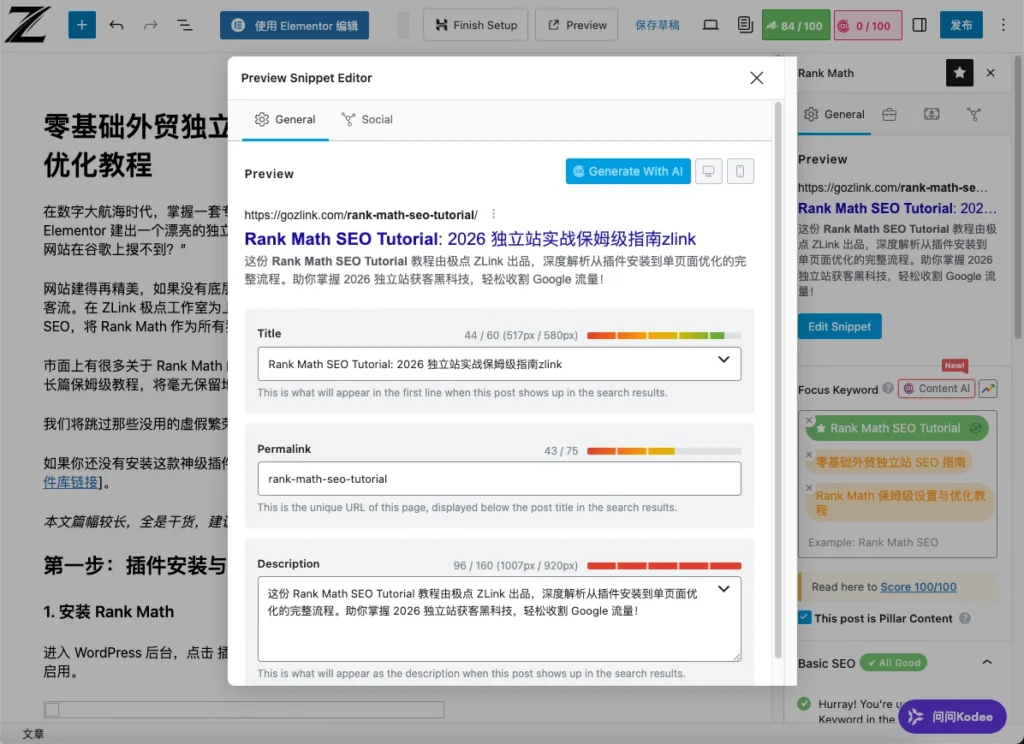
- Article Title (Title) 和 Meta Description The focus keyword must be included.
- URL (Permanent Link) Keywords must be included (in English only, separated by hyphens).
- First 10% of the article The keyword must appear naturally at least once in the text.
- The article meets the word count requirement.(It is recommended that English blog posts be at least 800–1,200 words long.)
-1024x753.webp "SEO Guide for Independent E-commerce Sites for Beginners: Step-by-Step Setup and Optimization Tutorial for Rank Math 28")
3. Additional SEO and Structured Layout
- 在 H2, H3 Subheadings Cleverly incorporate keywords throughout the text.
- Make sure to include at least A picture, and its ALT tag contains keywords.
- Add Internal Links Links to internal pages.
- Add External Links Links to authoritative industry websites.
Just follow the prompts step by step to optimize your score to 80 or higher, and you’ll fully meet the SEO requirements!
Conclusion: Strategy is more important than tools.
With the settings above, your website now has a foundational SEO architecture that far surpasses that of your competitors.
However, SEO tools are just running shoes; whether you can make it to the finish line depends on your core stamina—your website’s architecture and content quality.
- If your server frequently crashes or slows down, even the best SEO efforts will result in a lower search ranking (we recommend using Hostinger High-Performance Hosting)。
- Don’t let poor conversion rates waste your traffic. If you want to leave the experts to handle the expert work, we invite you to learn more about Jidian Studio’s ZLink Custom Website Development Services. We’ll provide you with high-conversion solutions that include in-depth SEO code implementation, ultra-fast response times, and a top-tier user interface.
SEO isn't something that happens overnight—go ahead and open the backend checklist to give your website a health check! If you encounter any configuration issues, feel free to leave a comment below.
Enter this code at checkout and click “Apply” to view the discounts available for your current plan; the actual price is subject to the Hostinger checkout page. View the full Instructions for Using the Hostinger Promo Code 2026ZLINK。